> For the complete documentation index, see [llms.txt](https://www.hardbreak.wiki/llms.txt). Markdown versions of documentation pages are available by appending `.md` to page URLs; this page is available as [Markdown](https://www.hardbreak.wiki/hardware-hacking/basics/tools/hardware-tools/uart-to-ttl-adapter.md).
# UART-to-TTL adapter
## **Theory**
A UART-to-TTL adapter is used to interface with UART communication ports, commonly found in embedded systems, by converting TTL (3.3V or 5V) signals to USB for interaction with a computer. The UART protocol uses three key pins: **TX** (Transmit), **RX** (Receive), and **GND** (Ground). The TX pin sends data from the device, RX receives data, and GND ensures a common reference for signal integrity. Correctly matching voltage levels (3.3V or 5V) between the adapter and the target device is crucial to prevent damage during communication.
## Usage
* Open your serial terminal software and configure the following settings:
* **Baud Rate**: Most popular values are 9600 and 115200, or as specified in the device’s documentation (picocom also has a feature to adjust the baud rate on the fly (check docs)).
* more common baud rates: 4800, 19200, 38400, 57600, 230400, 460800, 921600
* There are more settings you have to figure out, but the most common ones are these:
* **Data Bits**: 8
* **Parity**: None
* **Stop Bits**: 1
* **Flow Control**: None
{% tabs %}
{% tab title="Linux" %}
```bash
sudo minicom -D /dev/ttyUSB0 -b 115200
sudo picocom -b 115200 -r -l /dev/ttyUSB0
```
{% endtab %}
{% tab title="Windows" %}
**Using PuTTY (Windows)**:
* Select “Serial” and enter the COM port (e.g., COM3) and baud rate (115200).
{% endtab %}
{% endtabs %}
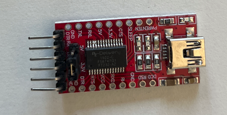
UART-TTL adapter are usually pretty cheap ($10) and compact like this model:
FT232-AZ USB to TTL serial adapter
Hint:
If you console looks like this, you probably have the wrong baud rate set:
False baud rate set
## Resources
* [RS232 vs TTL: Beginner Guide to Serial Communication](https://www.seeedstudio.com/blog/2019/12/11/rs232-vs-ttl-beginner-guide-to-serial-communication/)